AI scanning of expense documents: how it works and where it stops
How AI reads supplier invoices, how far to trust it, how it is checked against myDATA and what happens to your data — without the hype.
Supplier invoices, receipts, electricity and phone bills reach every business from everywhere: as a PDF in email, on paper inside the delivery box, as a photo from the driver’s phone. Then someone has to enter them: supplier, number, amounts, VAT — and, if you hold stock, every item line with quantity and price.
It’s one of the most repetitive jobs in any office, and precisely for that reason one of the first that artificial intelligence changes. But AI document scanning isn’t magic, and anyone who presents it that way is doing you a disservice. This article explains how it works, how far you can trust it, how it’s checked against myDATA, the Greek tax authority’s platform, and what to ask about your data.
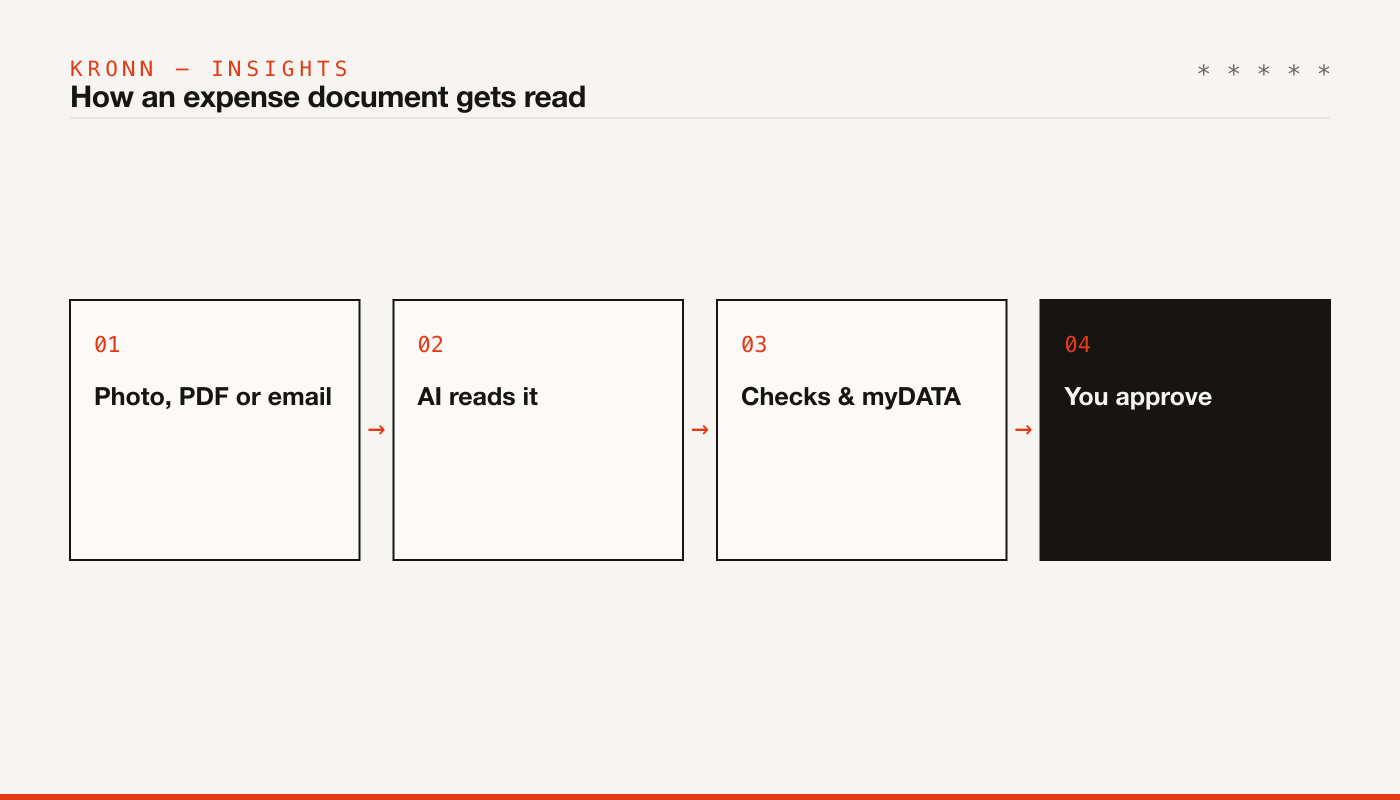
From OCR to today’s models
“Document reading” has existed for decades in the form of OCR: software that recognises characters in an image. OCR sees letters and numbers but doesn’t understand what they mean. To find an invoice’s total it needed a template per supplier — “the total is bottom right” — and every change to the supplier’s layout broke the template.
Today’s multimodal language models work differently. They read a document the way a person does: they understand who the issuer is and who the recipient is, which amount is the net value and which the VAT, where item lines start and end — on layouts they’ve never seen before. The result isn’t text but structured data: fields that go straight into the expense form.
The flip side: a language model can be wrong with complete confidence. A smudged digit can become a plausible but wrong digit. That’s why reading is only half the job; the other half is checking.
What it reads
From a typical supplier invoice, a good system reads:
- Issuer: name, VAT number, address.
- Document details: type, series, number, date, the MARK (myDATA registration number) if printed.
- Amounts: net value, VAT per rate, withholdings, total.
- Lines: description, supplier’s item code, quantity, unit, price, discount, VAT rate.
How accurate is it?
It’s the first question everyone asks — and it has no single answer. Accuracy depends mainly on the document itself: a clean PDF produced by the supplier’s software reads far more reliably than a crumpled receipt photographed on a truck’s dashboard, and far more reliably than a handwritten delivery note. Anyone who gives you a single accuracy percentage without telling you what documents it was measured on is giving you a number that doesn’t mean much.
The more useful question is different: how do I know when it read something wrong? That’s where a system proves itself.
The checks that make the difference
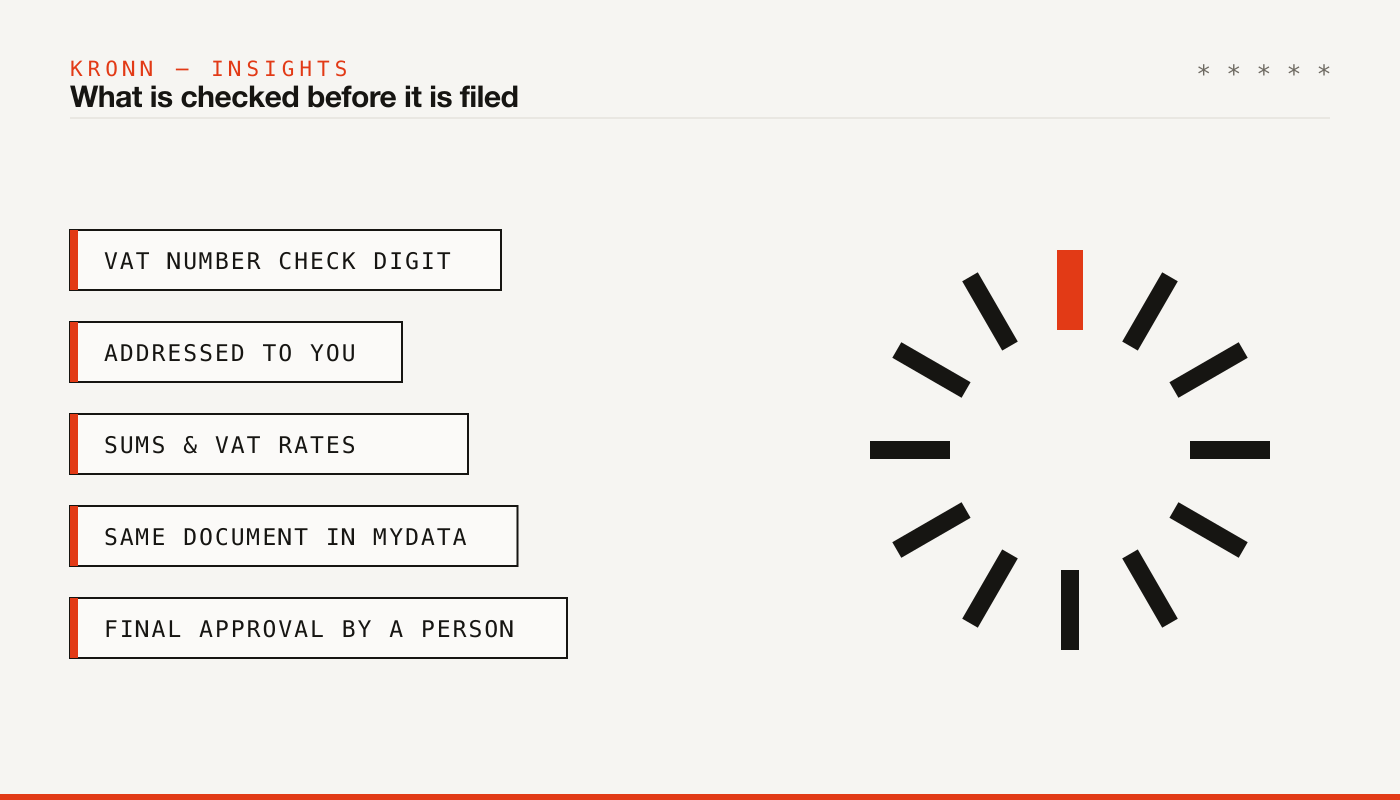
A serious system doesn’t trust the reading blindly. It checks it with rules that don’t depend on the AI:
- VAT number check digit. Every Greek VAT number (ΑΦΜ) carries a check digit; a wrong number is usually caught at once.
- Is it addressed to you? The recipient’s VAT number must be yours — otherwise it’s the wrong file, or one of your own sales that slipped into expenses.
- Sums. Net + VAT − withholdings + other charges = total. VAT lines agree with the totals.
- VAT rates. Does the rate exist in Greece? Does it match the amount?
- Dates and currency. A date in the future or very old, amounts in a foreign currency.
- Anything the AI itself flags: a cut-off photo, handwritten parts, or text in the document that looks like instructions to the system rather than a description of a transaction.
Whatever fails a check isn’t silently rejected; it’s flagged for a person to look at.
Matching against myDATA
With e-invoicing, more and more of your suppliers’ invoices reach myDATA with a MARK at the moment of issue; since 2/3/2026 Greek businesses must accept e-invoices from other Greek businesses (more in our article on Greek e-invoicing and myDATA). That gives scanning a valuable checkpoint.
The file that was read is looked up among your documents from myDATA: first by MARK, then by issuer, number and date, and finally by issuer and total around the same date. When MARK, issuer and total all agree and no check found an error, the file can be linked to the document without human intervention. In every other case, a person decides.
Why scan at all if myDATA already has the document? Because myDATA knows the amounts and classifications, but often not the item lines as the supplier writes them — descriptions, codes, quantities. Those are what you need for stock and for cost per item. And your accountant wants the document file anyway.
From document to stock
The real time saving isn’t in the totals; it’s in the lines. A wholesale invoice with forty lines takes a long time to enter by hand.
Here the system proposes, for each line, the matching item in your own stock: from the supplier’s code, the barcode, the description. And it learns: correct a proposal once, and the next time the same supplier writes the same description, the right item is proposed. Packs are converted — a box of 12 goes in as 12 pieces, at the cost per piece — and for each line you choose whether it goes into stock now, into expected goods, or isn’t stock at all.
Privacy: what to ask
Your expense documents say a lot: who your suppliers are, what you pay, on what terms. Before sending anything to an AI service, ask:
- Which AI provider is used, and through what (a business API or a consumer app)?
- Are files used to train models?
- What exactly is sent: only the file, or other business data too?
- Where are files stored, and for how long?
- Who can send files — if the service accepts email, what happens to an attachment from an unknown sender?
Where it stops
Well-designed document scanning does not file expenses or move stock without your approval (the only exception being linking a file to the exact same myDATA document, as described above). It doesn’t issue documents or send anything to the tax authority. It doesn’t treat an illegible file as correct; it flags it. And it doesn’t replace your accountant: it gives them cleaner data and every file in order.
AI scanning in Kronn Smart
In Kronn Smart, AI document scanning works exactly like this. You upload PDFs or photos (JPEG, PNG, WebP, HEIC, up to 20 MB) or forward your suppliers’ emails to your own inbox address; attachments are read when the sender is a member of your company or on your senders list and passes the DMARC check, otherwise they’re held until someone looks at them. Payment notices from AADE or e-EFKA that arrive in the same inbox are recognised, so you can move them to your obligations rather than your expenses.
For the reading, only the file is sent to the AI provider, together with your company’s name, VAT number and expense categories. We use Anthropic, OpenAI or Google through their business APIs, which don’t use the data to train models, and files are stored on our servers in Germany.
It costs €20 a month + VAT, billed yearly, with 300 documents a month; for more, packs of 100 documents at €10 + VAT. See the Kronn Smart plans or, if you want AI automation on your own workflows, our internal tools services and our article on AI agents. For anything else, write to us.